Protecting OpenAI, Anthropic, Gemini, and Other API Keys in Mobile Apps
2026-03-07 · KVProxy Team
If you're building a mobile app that uses OpenAI, Anthropic, Google Gemini, or any other third-party API, you've probably faced the same question:
"Where do I put the API key?"
Hardcoding it in the app binary is dangerous. Anyone can extract it in minutes using freely available tools. Building a custom backend just to proxy API calls is safe, but it's a lot of infrastructure for what should be a simple problem.
KVProxy was built to solve this. It's a managed proxy that sits between your mobile app and the APIs you use, securely injecting your keys at the network layer so they never touch the client. No custom backend, no key in the binary, and setup takes minutes.
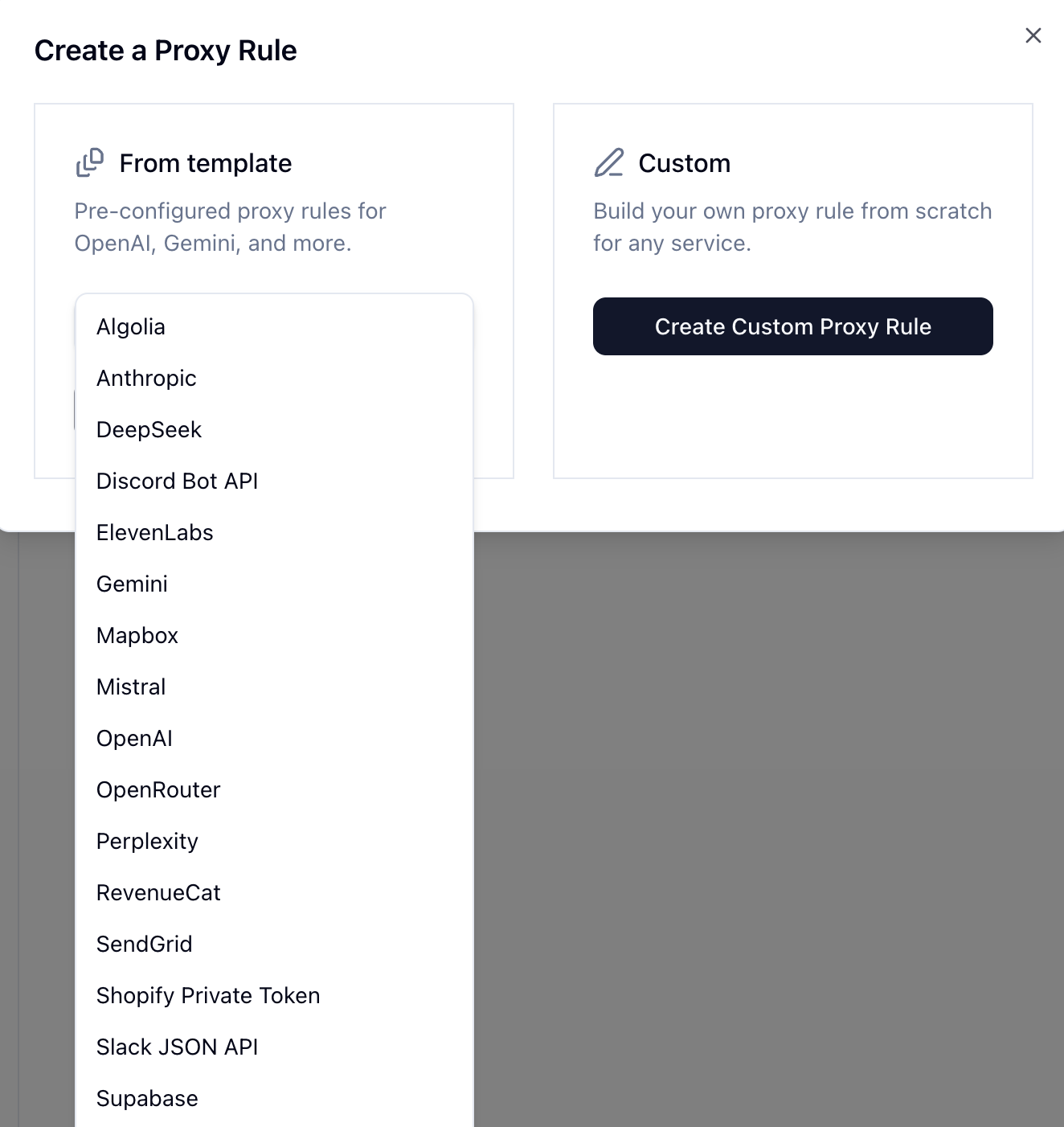
But not every API authenticates the same way. Some use Bearer tokens, others use custom headers, and some pass keys as URL parameters. That's why KVProxy ships with one-click templates for the most popular services — pre-configured proxy rules that handle each provider's auth scheme automatically.
The Problem: Every API Has Its Own Auth Scheme
If you're calling the OpenAI API, you need an Authorization: Bearer header. Anthropic uses a custom x-api-key header. Gemini passes credentials as a URL query parameter. ElevenLabs has its own xi-api-key header.
When you hardcode any of these in a mobile app, the key is sitting in the binary as a plain string. It doesn't matter whether you're building in Swift, Kotlin, or React Native — the key is extractable.
With KVProxy, you register your API key once in the dashboard, select the matching template, and your app makes normal network requests. KVProxy handles the rest.
Supported Services
KVProxy includes ready-made templates for a wide range of popular APIs. Here's what you can protect with one click:
AI and LLM Providers
-
OpenAI — Protect your keys for GPT-4o, ChatGPT, Codex, DALL-E, Whisper, and every other OpenAI model. KVProxy handles OpenAI's Bearer token auth and optionally injects Organization and Project headers too.
-
Anthropic — Secure your Claude API key. Whether you're using Claude Opus, Sonnet, or Haiku, KVProxy injects the
x-api-keyheader that Anthropic requires. -
Google Gemini — Gemini's API passes the key as a URL parameter rather than a header, which makes it even more visible in logs and network traces. KVProxy handles this automatically, keeping the key out of the URL entirely.
-
DeepSeek — Protect your DeepSeek API key with Bearer token injection, just like OpenAI.
-
Mistral — Secure your Mistral AI keys for models like Mistral Large and Codestral. Same Bearer auth pattern, handled automatically.
-
Perplexity — Keep your Perplexity API key safe while using their search-augmented models from your mobile app.
-
Together AI — Protect your Together API key for accessing open-source models like Llama, Mixtral, and others through their inference platform.
-
OpenRouter — If you route between multiple LLM providers through OpenRouter, KVProxy protects that single key that gives access to all of them.
Communication and Email
-
SendGrid — Sending transactional emails from your app? KVProxy protects your SendGrid API key so no one can send email on your behalf.
-
Discord — Secure your Discord bot tokens. KVProxy injects the
Botauthorization header and scopes it to Discord's API paths. -
Slack — Protect your Slack API tokens for bot integrations and app-to-workspace communication.
Commerce and Payments
-
Shopify — Protect your Shopify Storefront Private Token. KVProxy injects the custom
Shopify-Storefront-Private-Tokenheader so your mobile storefront stays secure. -
RevenueCat — Manage in-app subscriptions without exposing your RevenueCat API key in the app binary.
Infrastructure and Data
-
Supabase — Supabase requires both an
Authorizationheader and anapikeyheader. KVProxy handles both, scoped to your REST API paths. -
Algolia — Protect your Algolia search API key with the custom
X-Algolia-API-Keyheader injection. -
Mapbox — Mapbox passes the access token as a URL parameter. Like Gemini, KVProxy keeps it out of the URL so it doesn't leak in logs or referrer headers.
Voice and Media
- ElevenLabs — Building an app with AI-generated speech? KVProxy protects your ElevenLabs API key with their custom
xi-api-keyheader.
...and Many More
These templates cover the most common services, but KVProxy isn't limited to them. You can create custom proxy rules for any API: define the host, path, and how credentials should be injected (headers, URL parameters, or both). If a service uses an API key, KVProxy can protect it.
How It Works
The setup is the same regardless of which provider you're protecting:
- Add your API key in the KVProxy dashboard.
- Select a template (or create a custom rule) to configure how the key gets injected.
- Initialize KVProxy in your app with one line of code.
- Make normal network requests — KVProxy intercepts matching calls and injects credentials at the proxy layer.
Your app never sees the key. It's never in the binary. And because KVProxy also includes per-client rate limiting, DeviceCheck verification, and instant key revocation, you get abuse prevention built in.
// That's it. One line of code.
KVProxyInitialize(projectId: "your-project-id")
After that, every URLSession request to a matching host gets proxied automatically. No custom headers, no special networking code.
Why This Matters Now
AI APIs are expensive. A leaked OpenAI or Anthropic key can run up thousands of dollars in charges before you notice. And unlike a traditional backend API you control, you can't just rate-limit at the server — the third-party provider bills you for every request made with your key, regardless of who made it.
KVProxy gives you the controls that third-party APIs don't:
- Per-client rate limiting — Throttle individual devices, not just the key as a whole.
- DeviceCheck and App Attest — Verify that requests come from legitimate installs of your app.
- Instant key revocation — Rotate or kill a key in seconds from the dashboard, no app update required.
- Real-time analytics — See exactly how your keys are being used and catch anomalies early.
Get Started
Protecting your API keys takes minutes, not weeks. Head to kvproxy.com to create a free account, pick the template for your provider, and drop a single line of code into your app.
Your API keys belong on a server. Let's keep them there.